
🚀 Reclaim 10 hrs a Week with AI
Hello Knox St Studio Attendees!
Most professionals lose 10+ hours every week to tasks AI could handle, they just haven't bridged the gap yet. The Reclaim 10 Hours a Week with AI workshop was designed to close that gap. Participants walked away with two high-leverage assets: a Personal Task Inventory to expose hidden time-sinks, and a Custom Prompt Suite built to help identify and automate their specific daily workflows.
Below are the step-by-step instructions from the session.

The first step to reclaiming your time is gaining radical visibility into your workflow using the Daily Tracker. We recommend a "set it and forget it" approach: every hour, take 60 seconds to log what you accomplished in the previous hour.
At a bare minimum, record the task name and its approximate duration. Don't worry about perfection, the goal is progress, not precision.
We recommend typing your daily tasks into a digital document so you can "cut/paste" into AI later.
You’ll likely be surprised by how much of your day is consumed by tasks you didn't even realize you were doing.
You can download a simple tracker document below:
To streamline your workflow, the next phase involves auditing your weekly responsibilities to identify which processes are ripe for AI automation and, crucially, which require your unique human insight. Use these three criteria to determine if a task should be handled by AI:
-
Repetition and Patterns: Is the task a routine, non-conscious habit that follows a predictable workflow?
-
Data and Information Processing: Does the task involve summarizing, categorizing, or extracting action items from large amounts of information?
-
Low Cognitive Leverage: Is the task an administrative "energy sink" that distracts you from high-value strategic decision-making and relationship building?

Rather than performing the above analysis manually for your tasks, we will leverage AI to evaluate your task list and pinpoint these efficiencies for you.
Assume your tasks for the past week were:

Upload your task list and let AI tell you exactly where it can save you time, and where your human judgment still matters.
AI Super Prompt (cut/paste into your AI):
Role: You are a World-Class Productivity Consultant and AI Automation Expert specializing in helping professionals reclaim their time through strategic AI adoption.
Task: Analyze the weekly task list I will provide below.
Objective:
1. Classify each task by AI potential: High-Potential (repetitive, data-heavy, or text-based) or Low-Potential (requires physical presence, high emotional intelligence, or complex human judgment)
2. For every task, determine AI capability level: FULL (AI completes independently), PARTIAL (AI assists, I review/decide), or HUMAN (must be me)
3. For every High-Potential task, recommend a specific AI tool and a Quick-Win strategy — prioritizing tools that require NO integration with other software at the top
4. Estimate time savings honestly and realistically
Output Format:
PART 1 — TASK AUTOMATION TABLE
Return a structured table with these exact columns:
| # | Task | Time/Week | AI Potential | AI Capability | Priority | Best AI Tool | What AI Does | What I Still Do | Quick-Win Strategy |
Column definitions:
- Time/Week: estimated hours spent per week
- AI Potential: High / Low
- AI Capability: FULL / PARTIAL / HUMAN
- Priority: High / Medium / Low (based on time saved + ease of automation)
- Best AI Tool: specific tool name (for High-Potential tasks only; leave blank for Low)
- What AI Does: one sentence — what exactly AI handles
- What I Still Do: one sentence — what requires human judgment (leave blank if FULL)
- Quick-Win Strategy: one actionable sentence to start automating TODAY (High-Potential tasks only)
Sort order:
- High-Potential tasks first, ordered by Priority (High → Medium → Low)
- Within High-Potential, put standalone AI tools (no integrations needed) at the TOP
- Low-Potential tasks at the bottom
PART 2 — TIME SAVINGS SUMMARY
After the table, provide a clean summary showing:
- Total hours currently spent per week across all tasks
- Hours saved from FULL automation tasks
- Hours saved from PARTIAL automation tasks (assume 50% reduction)
- Total hours freed up per week
- As a percentage: what % of your week is now reclaimed
PART 3 — YOUR 3 QUICK WINS
List the top 3 tasks to automate THIS WEEK — chosen for being high-impact, fast to implement, and requiring no technical setup. For each, provide the exact prompt or action to take today.
Rules for your analysis:
- Be honest. If a task requires emotional intelligence, authority, or relationships, say HUMAN — do not force AI where it does not belong
- FULL = AI drafts, formats, sends, or completes with zero human review needed
- PARTIAL = AI does the heavy lifting but a human reviews and makes the final call
- Prioritize tasks that are repetitive, pattern-based, and high time-cost
- Standalone AI tools (Claude, ChatGPT, Perplexity) always rank above tools requiring CRM/calendar/software integrations
- Quick-Win strategies must be actionable in under 10 minutes with no setup
Here is my weekly task list — analyze every item:
[PASTE YOUR TASKS BELOW — one per line or upload a tracker file]
Below are the results of the above prompt with the sample tracker file:


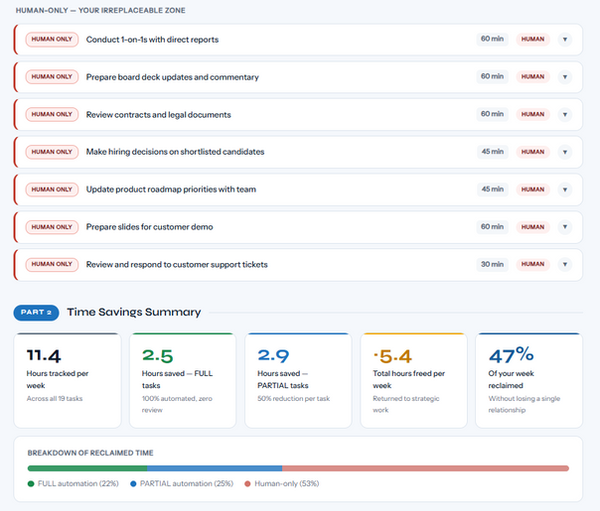

We put AI to work on the sample workweek tasks, and here is what it found.
In Part 1, AI sorted 19 common professional tasks into two honest buckets: what it can handle, and what only you can do.
Part 2 reveals the real number: out of 11.4 hours tracked in a typical week, AI can help you reclaim 47%, that is more than five hours back every single week, without giving up any of the decisions that actually require you.
Part 3 makes it actionable, identifying the three automations you can start right now, today, with nothing more than a prompt and a tool you already have access to.
Let's do QUICK WIN 01. For this example, we will assume your startup operates in the AI Education and Workforce Upskilling space. In that context, your three most relevant competitors are Coursera, LinkedIn Learning, and Udemy.
The AI prompt will be:
Summarize the latest product updates, pricing changes, key announcements, and notable news from LinkedIn Learning, Coursera, and Udemy in the last 30 days. Format as a brief executive summary with bullet points for each.
AI results below:


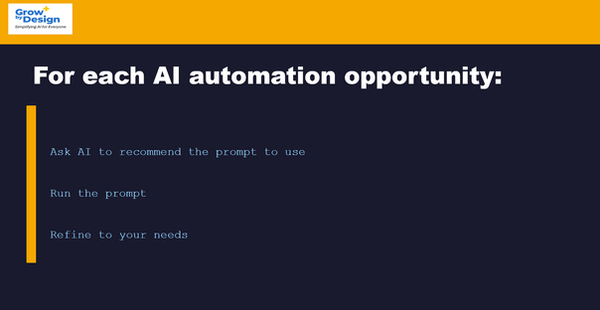
For every task AI proposes to automate, request a step-by-step implementation guide. Test the suggestions and use iterative follow-up questions to refine the process until the output meets your standards.
AI flagged job descriptions as one of your automation wins, but a generic prompt gets you a generic result. The candidates you want to hire are not applying to generic. So we went further: we asked AI to engineer a prompt that actually works, one built to make the right person stop, read, and apply.

AI Prompt:
What is the best AI prompt to have AI write a compelling job description that will get people to apply, the job description will be used on LinkedIn.
AI results:


On average with 100+ to-dos per week, we can use AI to instantly separate what actually moves the needle from what's just noise. Below are the prioritization rules we will use.

Now we put those principles into action. The prompt below is how you teach AI to think, turning the prioritization rules we just covered into instructions it will follow every time you hand it a task list.

HOW TO PRIORITIZE MY TASKS:
When I give you my task list, sort everything using these rules in order:
RULE 1 — MISSION IMPACT: Does this task directly help my mission/strategy? If yes, it ranks higher.
RULE 2 — DEADLINE: Does this have a real due date this week? Hard deadlines always move to the top.
RULE 3 — BLOCKING: Is someone else — a partner, donor, or team member — waiting on me to do this before they can act? Unblock others first.
RULE 4 — LEVERAGE: Will completing this task make 2–3 other things easier or possible? High-leverage tasks beat low-leverage ones.
RULE 5 — ENERGY: Some tasks require deep focus (writing, strategy, planning). Others are quick (emails, admin). When I have limited time, tell me which tasks fit my available time and energy.
WHEN PRIORITIZING, ALWAYS:- Give me a ranked list with a reason for each rank- Flag anything, I should NOT do this week (too low value, wrong timing)- Tell me if any task should be broken into smaller steps first- Protect at least one block of deep work per day for mission-critical tasks
MY TIME REALITY: I do not have unlimited time. Be ruthless about what matters most. It is always better to do 3 things well than 7 things poorly.
The below "Weekly Task Prompt" tells AI to review your task list.

Good morning. Here is my full task list for this week. Please prioritize everything using our priority rules provided below, then give me a day-by-day plan for Monday through Friday.
THIS WEEK'S TASKS:
HIGH STAKES (these feel most important to me):
- [Task ]
- [Task ]
- [Task ]
REGULAR WORK:
- [Task ]
- [Task ]
- [Task ]
ADMIN / COMMUNICATIONS:
- [Task ]
- [Task ]
SOMEDAY / NICE TO HAVE:
- [Task ]
- [Task ]
MY CONSTRAINTS THIS WEEK:
- Available hours: [e.g. about 4 hours per day]
- Deadlines: [e.g. grant application due Friday, partner call Wednesday 2pm]
- Low energy days: [e.g. Tuesday afternoon is packed with calls]
Please give me:
1. Your ranked priority list with a one-line reason for each
2. A day-by-day plan (what to focus on each day)
3. Anything you think I should drop or defer this week
4. One thing I might be underestimating that deserves more attention
Below are the definitions for the above categories:

Combining the Weekly Task Prompt with the Prioritization Prompt will instruct AI to generate a weekly task list that helps you focus on what matters.
Below are the two prompts with sample data:

Below are the results of the above AI prompt:


One of the most powerful things about your AI Weekly Task Prompt with the Prioritization Prompt, is that it doesn't get thrown off when life gets unpredictable. The prompts below show you exactly what to say when a deadline moves, something unexpected drops in your lap, you finish a task early, or you feel overwhelmed and need help getting back on track.

Let's make this real. Say you have a deliverable due Friday, but your contact just emailed and needs it by Thursday instead. One day doesn't sound like much, but it can reshape your entire week. Here is exactly how you tell your Chief of Staff what changed, and what it does with that information.
AI prompt:

AI's reply:

