Mid-Career: A 30-Day Blueprint to Mastering AI (Without the Jargon)


Artificial Intelligence shouldn't be reserved for the privileged; it is a mindset anyone can learn. Yet, as technology accelerates, many people, specially those in non-technical roles, feel a "digital divide" widening beneath their feet. At Grow by Design, we believe no one should be left behind in the Age of AI.
The goal isn't to become a coder; it’s to build confidence with accessible tools that help you thrive in a changing world. Here is how you can transform from an AI skeptic/newbie to an AI-empowered leader in just one hour a day.
The 4-Week AI Game Plan
Week 1: Make it Personal The best way to stop feeling intimidated is to bring AI into your everyday life. Start by using AI as a personal assistant for low-stakes tasks. Use it to plan your grocery list based on what’s in your fridge, draft a polite note to a neighbor, or explain a new hobby like gardening in simple terms. This "learn by doing" phase builds the muscle memory you need for the workplace.
Week 2: Solve the "Admin Burnout"
While we are using the Engineering Manager as our primary example, this process is a universal blueprint designed to be applied to any job function. The Engineering Manager job is often buried under documentation and reporting. This week, pick two friction points:
Reporting: Use AI to summarize messy technical updates from your team into a clear, high-level report for executives.
Decision-Making: Use AI to draft professional, supportive performance reviews or compare two different technical strategies based on your project constraints.
Week 3: Build Your First Workflow
Stop doing the same task three times. Create a "Bridge" workflow. For example, take the raw notes from a technical meeting and use AI to simultaneously generate a summary to share on your team messaging app, a list of action items for the technical team's task app, and a follow-up email to stakeholders. You are moving from "doing the work" to "orchestrating the results."
Week 4: Create a Mini AI Project
Real-world impact comes from building something repeatable. Create an "Onboarding Buddy" for your team. By feeding AI your team's FAQs and documentation, you create a tool that answers new hire questions instantly. This saves you hours of repetitive work and empowers your new engineers to find answers safely and quickly.
Unlocking Human Potential
Our mission has always been about unlocking human potential by design. Whether you are a shop floor worker, a finance leader, or an engineering manager, AI is a tool designed to serve you, not the other way around.
Detailed instructions
While we are using the Engineering Manager as our primary example, this process is a universal blueprint designed to be applied to any job function.
If you are new to AI, click below to setup Microsoft Copilot
📅 Week 1: Personal Life (The "Low Stakes" Phase)
Goal: Build "AI muscle memory" using tasks that don’t affect your job.
Time Investment: 1 hour/day.
The Meal Planner. Tell the AI what is in your fridge. Prompt: "I have chicken, spinach, and a lemon. Give me a 20-minute recipe and a grocery list for 3 other items I need to make a full meal."
Cut/Paste above prompt to your AI tool, below is example using Microsoft Copilot:

Click the "Up Arrow" to get the below results (note, your answer could differ):


Trust, but Verify: AI is a powerful partner, but it can sometimes make mistakes or "hallucinate" facts. Always double-check the information against your own expertise or the sources the AI provides.
Try the following prompts but most importantly, ask AI anything and see what it says!
The Gift Researcher. Prompt: "My friend loves 1970s jazz and gardening. Suggest 5 unique birthday gifts under $50."
The Email Polisher. Take a tricky personal email (like a landlord or a school coach). Ask the AI: "Make this sound more polite but firm."
The Travel Agent. Prompt: "Plan a 2-day walking itinerary for a weekend in Charleston, SC, focusing on history and seafood."
The Explainer. Ask the AI to explain a complex hobby you’ve always been curious about (like pickling or crypto). Prompt: "Explain how a home solar battery works like I'm 10 years old."
📅 Week 2: Engineering Management (The "Admin Buster")
Goal: Use AI to handle the "paperwork" of leadership so you can focus on your people.
Time Investment: 1 hour/day.
Step 1: Pick 2 Problems (Reporting & Decision-Making)
Problem A (Reporting): Status updates for executives.
Instruction: Take your raw bullet points from your team's weekly standup (sample below). Paste them into the AI and ask: "Rewrite these technical updates into a high-level summary for a non-technical VP. Focus on milestones and risks."

Click below to download the sample engineering notes:
Upload the sample engineering notes to Microsoft Copilot by clicking on the "+" sign and select "Add images or files".

Cut/Paste the prompt into Copilot:

After clicking on the "Up Arrow", you should get something similar:

Problem B (Decision-Making): Performance Review Drafting.
Instruction: Instead of staring at a blank page, list 3 things an employee did well and 1 area for growth (sample below). Ask: "Draft a supportive, professional performance review based on these points. Use an encouraging tone."

Click to download the sample performance review:
Upload the sample performance review notes and Cut/Paste the prompt into Copilot:

After clicking on the "Up Arrow", you should get something similar:

📅 Week 3: Automate Something (The "Workflow" Phase)
Goal: Create a "bridge" between different types of information. Time Investment: 1 hour/day.
The "Meeting-to-Action" Workflow
Engineering managers spend hours in meetings. Let’s automate the follow-up.
The Input: Record a meeting (with permission) or take messy, shorthand notes.
The Step-by-Step Instruction:
Task 1: Paste the notes and ask: "Identify the 5 most important technical decisions made in this text."
Task 2: Then say: "Now, create a task list with a 'Title', 'Description', and 'Assignee' for each action item."
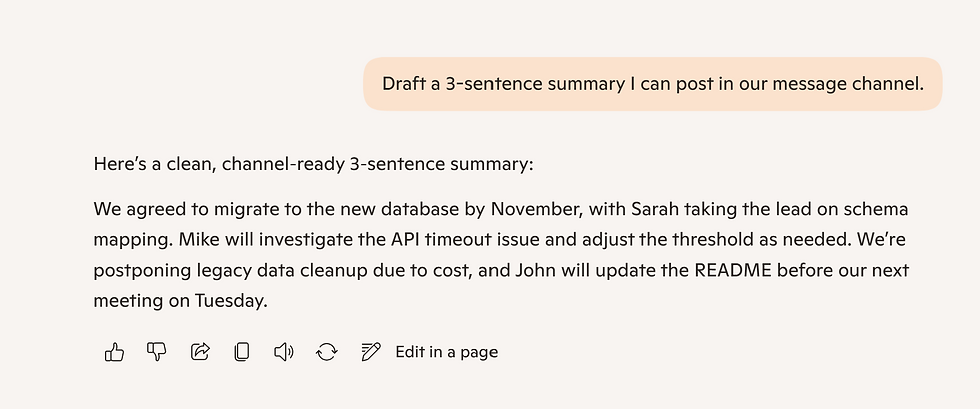
Task 3: Then say: "Draft a 3-sentence summary I can post in our message channel."
Below is a sample transcript from an engineering meeting:

Download the sample transcript below:
Upload the sample performance review notes and Cut/Paste the Task 1 prompt into Copilot:
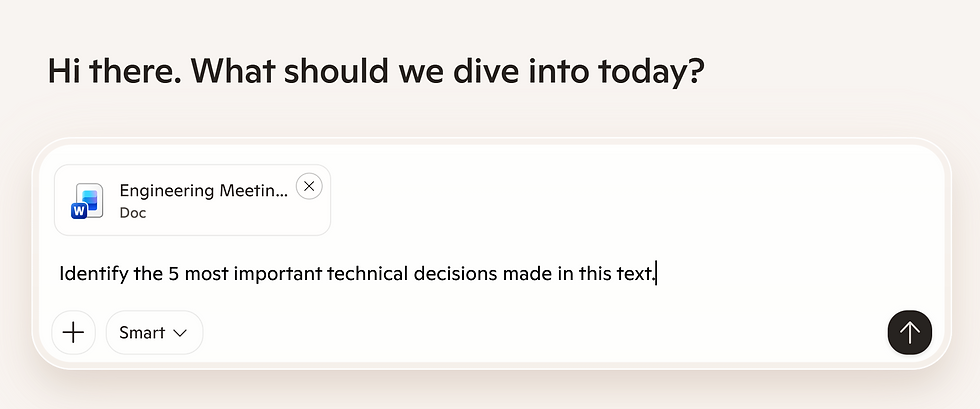
After clicking on the "Up Arrow", you should get something similar:

For Task 2 prompt results:

For Task 3 prompt results:
📅 Week 4: Build a "Mini AI Project" (The "Project" Phase)
Goal: Create a tool that helps your team transition through changes.
Time Investment: 1 hour/day.
Project: The "Onboarding Buddy"
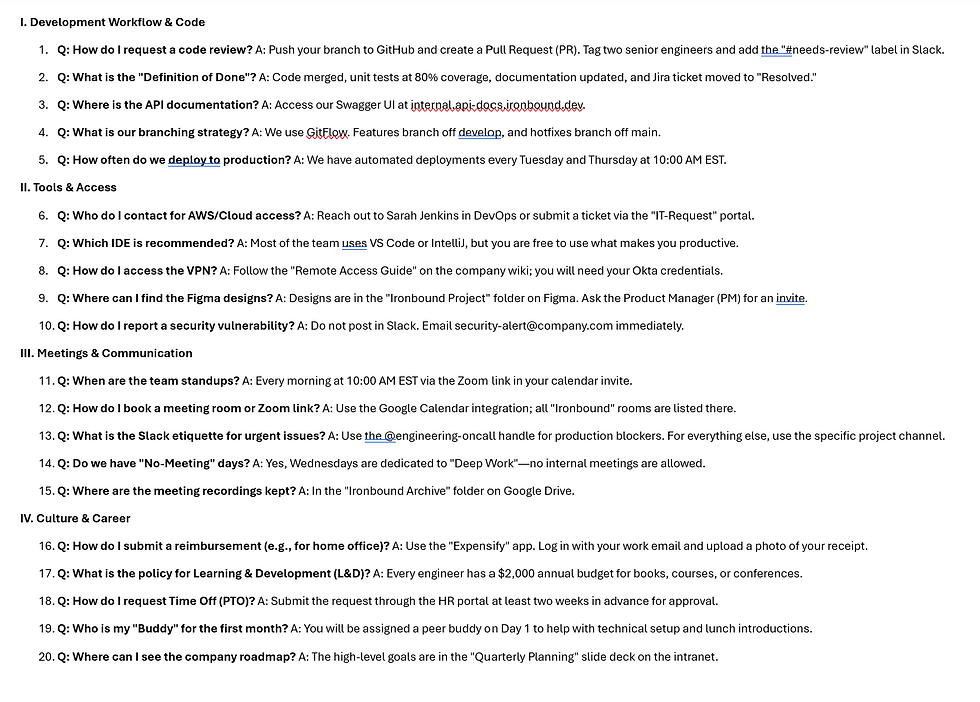
New engineers often ask the same 20 questions. You will build a "Knowledge Base Assistant."
Days 1-2 (Collect): Gather your team's "Frequently Asked Questions (FAQ)" (e.g., "How do I request a code review?" or "Where is the documentation for the API?").
Day 3 (Build): Create a document that lists these questions and the correct answers.
Day 4 (The AI Twist): Ask AI with this prompt: "You are an onboarding assistant for the Engineering Team. Use the attached FAQ document to answer questions. If you don't know the answer, tell them to message the Manager. What IDE should I use?"
Day 5 (Impact): Share the prompt or tool with your next new hire. You’ve just saved yourself hours of repetitive questions.
Below is a sample FAQ for the engineering department:
Download the engineering FAQ below:
Upload the sample FAQ and Cut/Paste the prompt into Copilot,

Try asking AI something that is not in the FAQ, such as, "What AI tool should I use?"

While we are manually uploading information, e.g. the FAQ document, please note that there are more automated ways to "feed" information to an AI so it remembers it forever.
We will cover those advanced tools, like Custom GPTs or "Knowledge Uploads", in later sessions.
For now, the goal of this exercise is to help you experience the "magic" of how AI uses the specific context and information you provide to give accurate, human-like answers.
By mastering this "context-first" approach, you are learning the foundation of how real AI products are built, one simple step at a time.


