
Finance Leaders: Meet AI Vibe Coding
- Josh Struck

- Oct 20, 2025
- 3 min read
Updated: Jan 31


Hello all, my name is Josh Struck. I’m a finance leader passionate about strengthening my financial prowess. I use AI and vibe coding as an accelerator for financial analysis — helping me build models faster, explore scenarios more efficiently, and focus on strategic insights. The following blog shows you, step by step, how to use vibe coding to improve your own financial analysis and decision-making.


Finance is built on precision and speed. But let’s be honest, most days, finance pros are stuck in spreadsheets.
Typing formulas
Debugging macros
Reconciling endless rows of data.
Important? Absolutely, but this keeps expertise trapped in mechanics instead of fueling insights.
💡 Enter Vibe Coding
Vibe coding turns plain language into execution. No formulas. No macros. No code.
Example:
Old way: In your spreadsheet, you would code: =Revenue - Cost
New way: Leverage AI, you would ask it "Calculate Profit by subtracting Cost from Revenue.”
Same result. Radically simpler.
Why It Matters
✅ Automation without coding – Free your team from repetitive, error-prone tasks.
✅ Your expertise, executed – Translate business logic directly into action.
✅ More insight, less friction – Spend time analyzing, not formatting.
The Real Shift
This isn’t about replacing finance professionals, it’s about amplifying their efforts.
AI handles the execution. Finance leaders bring the judgment, context, and strategy.
The result?
Workflows that are faster, smarter, and more resilient. Less friction. More value. Greater impact.
🚀 That’s Vibe Coding: Your expertise + plain language = instant execution.

Every finance professional knows the grind: reports, reconciliations, endless data.
Vibe Coding changes that, turning your words into automated workflows that let AI handle the mechanics.
Watch this video to understand how Vibe Coding can help you focus on what really drives financial success.

🚀 Vibe Coding with Microsoft Copilot
Let’s get hands-on with Vibe Coding, follow the steps below to experience how AI can streamline and elevate your financial analysis process.
1) Grab the sample data
Download below Excel and keep it handy: Simple Excel Instructions
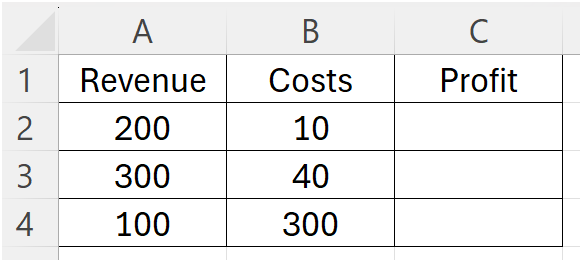
The file has two tabs:
Instructions: contains the steps I want AI to do, e.g. Go to tab Sales and subtract column costs from column revenue and place answer in column profit, show results

Sales: Test data, sales and costs information and no profit data
2) Open Copilot on the web
Go to copilot.microsoft.com
Optional: Sign in with a Microsoft account so you can attach files.
3) Start a new AI chat and attach your data
Click the attach (+) icon.

Click "Add images or files"

Add the "Simple Excel Instructions" file; you will see the file uploaded

If file upload isn’t available, skip to Step 4b
4a) Paste this vibe code instruction: "Follow directions in the instructions tab"

Go to step 5a)
4b) Paste this vibe code instruction: "Day 1 revenue is 200 with cost 10, day 2 revenue is 300 with cost 40, day 3 revenue is 100 with cost 300; calculate profit for day 1, 2, 3"

Go to step 5b)
5a) Review
Copilot will execute the instructions and fill in the "Profit" values
Always validate AI results since it can make mistakes

Go to Step 6)
5b) Review
Copilot will execute the instructions and calculate the "Profit" values
Always validate AI results since it can make mistakes

6) Now, let’s take it up a notch. We’ll ask AI to tackle more complex financial processes using Vibe Coding.
Download the below sample finance data file: "Complex_Excel_Instructions"
7) Upload “Complex_Excel_Instructions” into Copilot, and ask it to execute the instructions. Type: "follow instructions in the uploaded file instructions tab"
Before running, review the Excel file to understand the provided data and how each instruction is structured.

8) Review
Copilot will execute the instructions
Always validate AI results since it can make mistakes




Comments